So far, we have only developed read-only views of our loaded data. Now, we will learn to build forms to create new records and well as update existing records. In this module we will add the following views, along with their related URL patterns and tempates:
| app | view | URL pattern name | template |
|---|---|---|---|
| service | WorkOrderCreate | workorder-create | generic_form.html |
| WorkOrderUpdate | workorder-update | generic_form.html | |
| WorkOrderTypeList | workordertype-list | service/workordertype_list.html | |
| WorkOrderTypeCreate | workordertype-create | generic_form.html | |
| WorkOrderTypeUpdate | workordertype-update | generic_form.html | |
| location | LocationCreate | location-create | generic_form.html |
| LocationUpdate | location-update | generic_form.html |
view: service.WorkOrderCreate
# service/views.py
from django.views.generic import ListView, DetailView, CreateView, UpdateView
from .models import *

class WorkOrderList(ListView):
    # Return all workorders
    model = WorkOrder
    template_name = 'service/workorder_list.html'

class WorkOrderDetail(DetailView):
    # Return specific WorkOrder with all its information
    model = WorkOrder
    template_name = 'service/workorder_detail.html'

class WorkOrderCreate(CreateView):
    # Create workorder
    model = WorkOrder
    fields = ['location','work_order_type','work_order_date','description']
    template_name = 'generic_form.html'
    success_url="/service/workorder"
For now, I have chosen to demonstrate the simplest forms possible.
- generic class Views. In the previous lesson, we used ListView and DetailView to build read-only views of the data. Notice a change I have made to that part of the code. I changed the import. It does the same thing. The new code is just a bit cleaner.
- Previous code
- from django.views import generic
- class WorkOrderList(generic.ListView):
- New code
- from django.views.generic import ListView, DetailView, CreateView, UpdateView
- class WorkOrderList(ListView):
- To build a form, I am using the generic CreateView. Using these generic views you get a ton of functionality and only have to write a little bit of code.
- Previous code
- model -> the table in which the data is to be stored
- fields -> the columns in the table which are to be made available for input
- tempate_name -> the html file which will be providing the interface for data entry. I have chosen an extremely generic approach for now.
- success_url -> the system needs to know what to do once the record has been created. “/service/workorder” says to open the WorkOrder List.
URL Pattern: workorder-create
path('new/', views.WorkOrderCreate.as_view(), name='workorder-create'),‘new/’ -> The URL patterns have to be unique to the app, and they have to be ordered in such a way that when the system goes down the list of patterns, it stops when it finds a match and calls the correct view. In this case, it will pass ‘workorder/’, ‘workordertype/’, and stop at ‘new/’. At that point it will apply the WorkOrderCreate view.
template: generic_form.html
<!-- generic_form.html -->
{% extends 'base.html' %}

{% block content %}

<form method="POST">{% csrf_token %}

	{{ form.as_p }}

       <input type="submit" name="submit">
</form>

{% endblock %}- <form method=”POST”> … </form> -> A requirement for forms
- {% csrf_token %} -> A requirement for Django forms
- {{ form.as_p }} -> A quick and easy way to create a form. {{ form.as_table }} would also work, making the fields display horizontally, rather than vertically. It’s not pretty, but it works.
- <input type=”submit” name=”submit”> -> Necessary to send the information that has been entered to the database.
Resulting display:
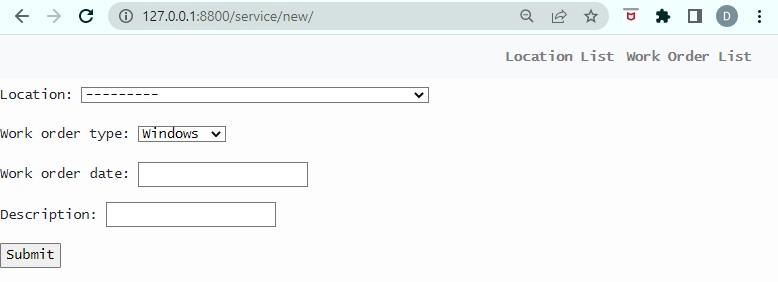
Again, this is the simplest form you can create. For the next form I’m going to add just a little more code to make the generic_form.html a bit better.
view: service.WorkOrderUpdate
# service/views.py

...

class WorkOrderUpdate(UpdateView):
    # Update workorder
    model = WorkOrder
    fields = ['location','work_order_type','work_order_date','description']
    template_name = 'generic_form.html'
    success_url="/service/workorder/"

    def get_context_data(self, **kwargs):
        data = super().get_context_data(**kwargs)
        data['title'] = 'Update Workorder#' + str(self.object.id)
        data['heading'] = 'Update WorkOrder#' + str(self.object.id)
        return data
In their simplest form, there is no difference between the use of CreateView and UpdateView. They can even use the same template. What I have added here to the UpdateView should also be added to the CreateView.
What I have done with this additional code is override the get_context_data function of the generic view. The reason I am doing this is so I can send the generic form a different title and heading, depending on the view that is calling it.
    def get_context_data(self, **kwargs):
        data = super().get_context_data(**kwargs)
        ...
        return data
This part of the code is how the function is to be called, with data being the list variable defined to hold any new data to be passed to the template.
data[‘title’] -> is defined for the assignment of some data – in this case the title for the template (title is displayed on the tab at the top of the browser).
‘Update Workorder#’ + str(self.object.id) -> Here we have static text with dynamic text appended. In this case, the id of the WorkOrder (object.id) is cast as a string using str(), and then appended to the static text using “+”. All this is assigned to data[‘title’]. In the template the value will be displayed using {{ title }}.
data[‘heading’] = ‘Update WorkOrder#’ + str(self.object.id) -> In this case the same information is stored the the heading of the template as for the title – but often they will be different. It is best to keep the title short, and put any distinguishing characters at the front. (This is to enable users with many windows open in their browser to spot the window they need more easily.)
URL Pattern: workorder-update
    path('<str:pk>/', views.WorkOrderDetail.as_view(),  name='workorder-detail'),
    path('<str:pk>/update/', views.WorkOrderUpdate.as_view(),  name='workorder-update'),
‘<str:pk>/update/’ -> ViewDetail and ViewUpdate both require the same parameter; therefore, something has to be done to the URL to distinguish one from the other. In this case, update/ is added to the end for the update pattern.
The same template is often used for Create and Update. I have added some lines for the title and header.
<!-- generic_form.html -->
{% extends 'base.html' %}

{%  block title %}
 {{ title }}
{% endblock title %}

{%  block heading %}
 {{ heading }}
{% endblock heading %}

{% block content %}
		<form method="POST">{% csrf_token %}

		 {{ form.as_p }}

		  <input type="submit" name="submit">
		</form>
{% endblock %}
I also added blocks to base.html for the title and header with the expectation that most templates will provide that information. It helps provide a consistent look and feel. But, if the information is not provided, it doesn’t break anything.
<!DOCTYPE html>
<html>
    <head>
	<title>
	{% block title %}
	{% endblock title %}
	</title>
      <!-- Stylesheet links -->
        ...
    </head>
    <body>
<style>
...
</style>

        <!-- Navigation -->
	{% include 'navbar.html' %}
	<h3>
	{% block heading %}
	{% endblock heading %}
	</h3>
... etc.
Here’s what you should see displayed for WorkOrderUpdate if the id “4” is passed:

We don’t yet have a way to get to these two forms except by manual entry. Next we are going to add links to them from the Work Order List.
{% block content %}

<table class="table">
  <thead>
    <tr>
	  <th>Work Order Type  </th>
	  <th>Work Order   #   </th>
	  <th>Date             </th>
	  <th>Location         </th>
	  <th>Description      </th>
	  <th></th>
	</tr>
  </thead>
  <tbody>

    {% for workorder in workorder_list %}

    <tr>
	  <td>{{ workorder.work_order_type }}</td>
	  <td>{{ workorder.id              }}</td>
	  <td>{{ workorder.work_order_date }}</td>
	  <td>{{ workorder.location        }}</td>
	  <td>{{ workorder.description     }}</td>
	  <td><a href="{% url 'service:workorder-update' workorder.id %}">Edit</a></td>
	</tr>

    {% endfor %}
  </tbody>
</table>
<a href="{% url 'service:workorder-create' %}">Add New Workorder</a>
{% endblock %}
Results:
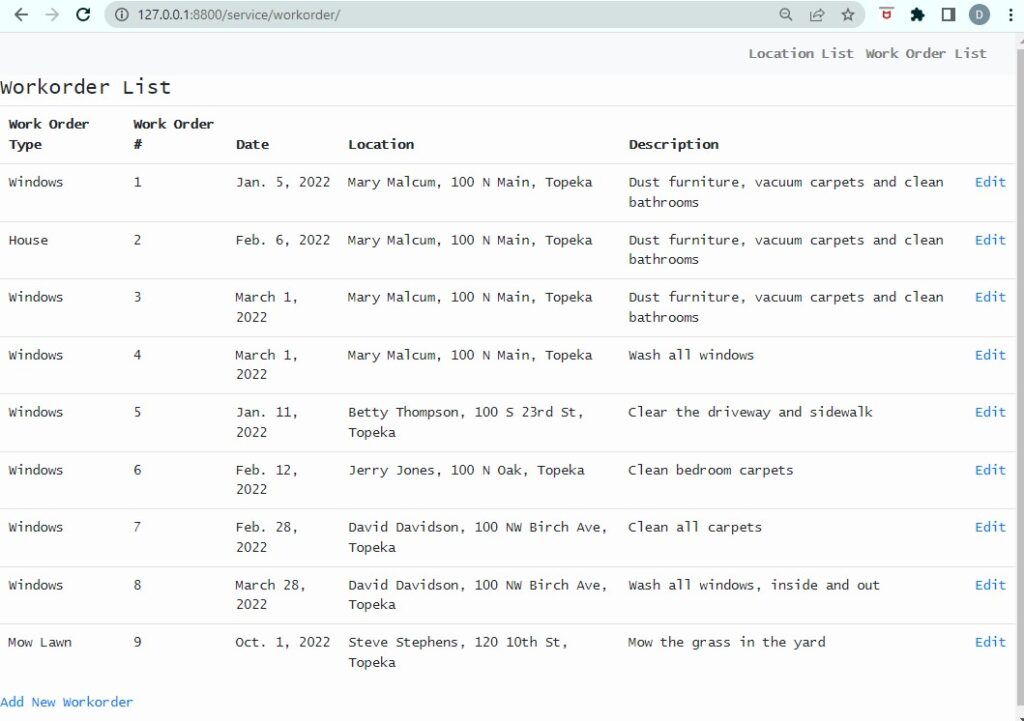
Now we have completed a very simple project. It doesn’t do a lot, but it’s a start. We have apps, views, templates, including a base template – all the basics.