A view is basically a function that receives a web request and returns a web response. The goal is to create views, create HTML template for the data returned by these views, and map them with specific URLs.
views
Update service/views.py
This is a representation of one of the simplest ways to write a view. It uses generic classes without overriding any methods. They generate read-only views of the data, not forms which allow the user to update the data. (We will get to that later.)
from .models import WorkOrder -> gets the WorkOrder model from models.py in the same directory as this view.
model = WorkOrder -> tells the system to retrieve data from the WorkOrder model (ie., the service_workorder table)
template_name = ‘service\workorder_list.html’ -> tells the system what html file to use to render the data it retrieves.
# service/views.py
from django.views import generic
from .models import WorkOrder

class WorkOrderList(generic.ListView):
    # Return all workorders
    model = WorkOrder
    template_name = 'service/workorder_list.html'

class WorkOrderDetail(generic.DetailView):
    # Return specific WorkOrder with all its information
    model = WorkOrder
    template_name = 'service/workorder_detail.html'
Update service/views.py:
This view introduces just a little more complexity.
from service.models import WorkOrder -> gets the WorkOrder model from models.py in the service directory.
queryset = Location.objects.all() => does the same thing as model=Location. But queryset could be set to a filtered set of data, like Location.objects.filter(state=’OK’) – just as an example.
def get_context_data => overrides the method as it is defined in the generic DetailView. The reason I am overriding this method is because I want to not only display the given Location, but also a list of all the WorkOrder’s associated with that Location.
self.object.id => the primary key of the Location record
data[‘workorder_list’] = WorkOrder.objects.filter(location_id=location_id) => retrieves the WorkOrder records with location_id the same as the id of the given Location and makes it available to the template in a list called workorder_list.
There are many other methods which can be overridden, as required. Also, if more flexibility is needed, a function can be defined instead of a generic class. However, we will not get into that now.
# location/views.py
from django.views import generic
from service.models import WorkOrder
from .models import Location

class LocationList(generic.ListView):
    # Return all locations
    queryset = Location.objects.all()
    template_name = 'location/location_list.html'


class LocationDetail(generic.DetailView):
    # Return specific Location with all its information
    model = Location
    template_name = 'location/location_detail.html'

    def get_context_data(self, **kwargs):
        data = super().get_context_data(**kwargs)
        location_id = self.object.id

        data['workorder_list'] = WorkOrder.objects.filter(location_id=location_id)
        return data
url patterns
When a user makes a request to the page, the Django controller checks the URLs to return the right view. The code below basically says,
- If the user runs http://127.0.0.1:8800/location/
- The system will get its instructions from LocationList in location/views.py, including what data to retrieve and using what template.
- If the user runs http://127.0.0.1:8800/location/12/
- The system will get its instructions from LocationDetail in location/views.py, including what data to retrieve for the given primary key, and using what template.
Add a file in the location directory and in the service directory named urls.py and insert this code:
# location/urls.py
from . import views
from django.urls import path

app_name = 'location'

urlpatterns = [
    path('', views.LocationList.as_view(), name='location-list'),
    path('<str:pk>/', views.LocationDetail.as_view(),  name='location-detail'),
]
# service/urls.py
from . import views
from django.urls import path
app_name = 'service'
urlpatterns = [
path('workorder/', views.WorkOrderList.as_view(), name='workorder-list'),
path('workorder/<str:pk>/', views.WorkOrderDetail.as_view(), name='workorder-detail'),
]Now, the URLs from the apps need to be imported in the urls.py file of the tutorial directory. Update the existing tutorial/urls.py file.
# urls.py
from django.contrib import admin
from django.urls import path, include
from django.views.generic.base import TemplateView

urlpatterns = [
    path('admin/', admin.site.urls),
    path('', TemplateView.as_view(template_name='index.html'), name='home'),
    path('location/', include('location.urls')),
    path('service/', include('service.urls')),
]
TEMPLATES
Templates for views are created by using HTML, CSS and Django template language. First, let’s create a directory for templates in the base directory.
To use the templates, they need to be configured in the settings first. Go to tutorial/settings.py and modify the TEMPLATES code:
TEMPLATES = [
    {
        'BACKEND': 'django.template.backends.django.DjangoTemplates',
        'DIRS': [os.path.join(BASE_DIR, 'templates')],
        'APP_DIRS': True,
        'OPTIONS': {
            'context_processors': [
                'django.template.context_processors.debug',
                'django.template.context_processors.request',
                'django.contrib.auth.context_processors.auth',
                'django.contrib.messages.context_processors.messages',
            ],
        },
    },
]
Base Template
The base template is the “skeleton” of the templates. It includes the header, navigation bar, the content & the footer. I place this in a directory named templates at the same directory level as manage.py.
Here is some start code for a base template.
<!DOCTYPE html>
<html>
    <head>
        <title>Tutorial</title>

        <!-- Add project-wide stylesheets here -->
<link href="https://fonts.googleapis.com/css?family=Roboto:400,700" rel="stylesheet">
<meta name="google" content="notranslate" />
<meta name="viewport" content="width=device-width, initial-scale=1" />
<link rel="stylesheet" href="https://maxcdn.bootstrapcdn.com/bootstrap/4.0.0/css/bootstrap.min.css" integrity="sha384-Gn5384xqQ1aoWXA+058RXPxPg6fy4IWvTNh0E263XmFcJlSAwiGgFAW/dAiS6JXm"
            crossorigin="anonymous" />
<link rel="stylesheet" href="https://cdnjs.cloudflare.com/ajax/libs/font-awesome/4.7.0/css/font-awesome.min.css">

    </head>
    <body>
      <style>
        <!-- Add project-wide style here -->
      </style>

        <!-- Navigation -->
	{% include 'navbar.html' %}

        {% block content %}
        <!-- Content Goes here -->
        {% endblock content %}

        <!-- Footer -->
        <footer class="py-3 bg-grey"> Isn't coding fun!  </footer>
    </body>
</html>
navigation
Notice in the base.html the line: {% include ‘navbar.html’ %}. Putting your html for your project-wide navigation in a separate file and “including” it in your base template is a good idea. Here is some start-up code for navbar.html:
<nav class="navbar navbar-expand-lg navbar-light bg-light shadow" id="mainNav">
<div class="container-fluid">
  <div class="collapse navbar-collapse" id="navbarResponsive">
    <ul class="navbar-nav ml-auto">
      <li class="nav-item text-black">
        <a class="nav-link text-black font-weight-bold" href="{% url 'location:location-list' %}" >Location List</a>
      </li>
      <li class="nav-item text-black">
        <a class="nav-link text-black font-weight-bold" href="{% url 'service:workorder-list' %}" >Work Order List</a>
      </li>
    </ul>
  </div>
</div>
</nav>
HOME PAGE
The file index.html is designed to provide a “home page” for the project. This one is very basic.
{% extends 'base.html' %}
{% load static %}
{% block content %}
<div class="container">
  <div class="row">
   <p><a href="{% url 'location:location-list' %}" >
         Location List</a>
   </p>
  </div>
  <div class="row">
   <p><a href="{% url 'service:workorder-list' %}" >
         Work Order List</a>
   </p>
  </div>
 </div>
{% endblock content %}
This is a great place to explain how the code we have written so far work together. For this, I will use “service” as an example.
- service/models.py -> provides the
- instructions for building the tables service_workorder, service_workordertype.
- the relationship between service_workorder and service_workordertype and between service_workorder and location_location. Example: models.ForeignKey(Location, on_delete=models.CASCADE)
- some information about how data should be displayed.
- __str__(self) provides a default value returned for the model. return self.name will provide just the data in the field name, not the rest of the fields – as a default.
- class Meta can provide other information, for example, ordering = [“name”] will by default order the records alphabetically by name. Without this, the default ordering would be by id, the primary key of the table.
- other things like models.CharField() and models.DateField() not only control how the fields in the database are defined, but also how the data is rendered in templates.
- service/views.py -> contains classes and/or functions for each “view” of your data rendered through the browser. More details about the views has been provided above. These functions can actually do a lot more than that, but we’ll keep it simple for now.
- service/urls.py -> contains URL patterns. What that means is, when a user runs a URL from the browser, that URL is compared to the URL patterns in urls.py, starting with the one defined in the project folder, then navigating to the patterns “included” in that urls.py. When the matching pattern is found, it calls the View associated with that pattern, passing to that view any parameters associated with the pattern. The “name” associated with the pattern is used in links defined in templates. (See navbar.html for examples of this)
- templates -> We haven’t described templates that display our data, yet. That comes next. But I will explain here how the URLs are applied in a template. In index.html there is a hyperlink defined as <a href=”{% url ‘location:location-list’ %}” >Location List</a> This tells the system to go to locations/urls.py, find the pattern with the name location-list, and call the view in location/views.py associated with that name, LocationList. This example does not pass any parameters to the view, and the view doesn’t require any. The view says to render the data in the template location/location_list.html (which we will define next).
Templates for the apps
The template (html file) below will render a read-only list of workorders. The information it renders is controlled by the view WorkOrderList in service/views.py.
- Anything between {% %} is Django instructions.
- {% extends “base.html” %} -> the html in this file will be nested within the indicated blocks in base.html; for example., between {% block content %} and {% endblock %}.
- {% for workorder in workorder_list %} -> workorder_list is a Python list of data. This code loops through each record in the list.
- Anything between {{ }} is data which is to be displayed.
- {{ workorder.work_order_type }} -> displays the data in the work_order_type field of the current workorder record.
<!-- service/workorder_list.html -->
{% extends "base.html" %}
{% block content %}
<header>
   <h3>Work Order List</h3>
</header>

<table class="table">
  <thead>
    <tr>
	  <th>Service Type  </th>
	  <th>Workorder #   </th>
	  <th>Service Date  </th>
	  <th>Location      </th>
	  <th>Description   </th>
	</tr>
  </thead>
  <tbody>

    {% for workorder in workorder_list %}

    <tr>
	  <td>{{ workorder.work_order_type }}</td>
	  <td>{{ workorder.id              }}</td>
	  <td>{{ workorder.work_order_date }}</td>
	  <td>{{ workorder.location        }}</td>
	  <td>{{ workorder.description     }}</td>
	</tr>

    {% endfor %}
  </tbody>
</table>
{% endblock %}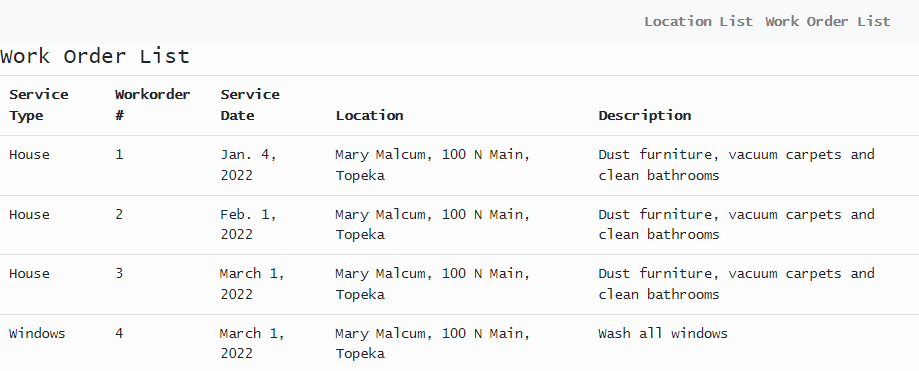
The template (html file) below will render a single read-only record describing a Location, plus a list of all the workorder associated with that Location. The information it renders is controlled by the view LocationDetail in location/views.py. You’ll notice in the html that there is no need to go through a loop for location because there is only one. But the loop for the workorder_list is the same as above, the only difference being, workorder.location has been left off.
<!-- location/location_detail.html -->
{% extends 'base.html' %}
{% block content %}
<div class="container">
  <div class="row">
        <!-- Location Details -->
    <div class="col-md-8 card mb-4  mt-3 left  top">
      <div class="card-body">
        <h1>{{ location.name }} </h1>
        <p>Address: {{ location.address }}
                  , {{ location.city    }}
                    {{ location.state   }}
                    {{ location.zipcode }} </p>
        <p>Phone:   {{ location.phone   }} </p>
      </div>
    </div>
  </div>
  <div class="row">
	<header>
	   <h3>Work Order List</h3>
	</header>
	<table class="table">
	  <thead>
		<tr>
		  <th>Service Type  </th>
		  <th>Workorder #   </th>
		  <th>Service Date  </th>
		  <th>Description   </th>
		</tr>
	  </thead>
	  <tbody>
		{% for workorder in workorder_list %}
		<tr>
		  <td>{{ workorder.work_order_type    }}</td>
		  <td>{{ workorder.id }}</td>
		  <td>{{ workorder.work_order_date    }}</td>
		  <td>{{ workorder.description }}</td>
		</tr>
		{% endfor %}
	  </tbody>
	</table>
    </div>
</div>
{% endblock content %}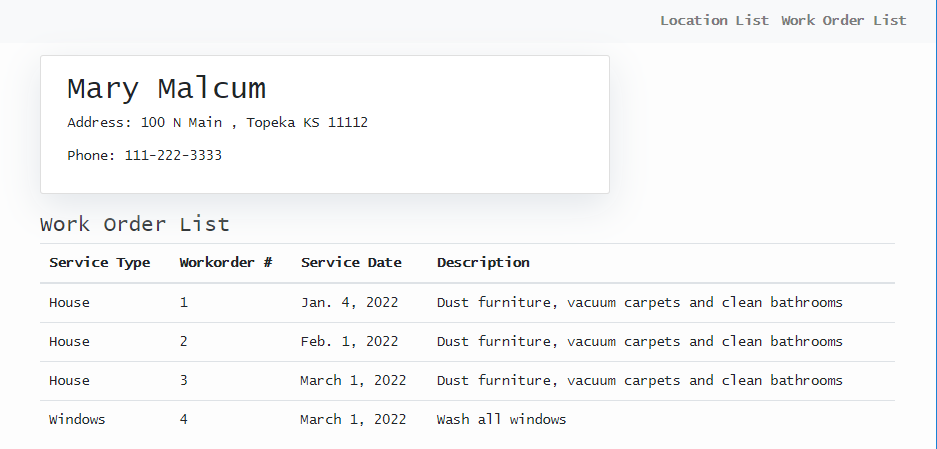
The template (html file) below will render a read-only list of locations. The information it renders is controlled by the view LocationList in location/views.py. The only thing different here is a button has been added to open to Location Details.
<a href=”{% url ‘location:location-detail’ location.id %}” class=”btn btn-primary”>Location Details</a> -> This tells the system to go to location/urls.py, find the pattern with the name location-detail, and call the view in location/views.py associated with that name, LocationDetail. This view expects 1 parameter and location.id provides that. The view says to render the data in the template location/location_detail.html for that specific location with that id.
<!-- location/location_list.html -->
{% extends "base.html" %}
{% block content %}
<header>
   <h3>Location List</h3>
</header>
<table class="table">
  <thead>
    <tr>
	  <th>Location Name</th>
	  <th>Address      </th>
	  <th>City         </th>
	  <th>State        </th>
	  <th>Zip Code     </th>
	  <th>Phone        </th>
	  <th>             </th>
	</tr>
  </thead>
  <tbody>
    {% for location in location_list %}
    <tr>
	  <td>{{ location.name    }}</td>
	  <td>{{ location.address }}</td>
	  <td>{{ location.city    }}</td>
	  <td>{{ location.state   }}</td>
	  <td>{{ location.zipcode }}</td>
	  <td>{{ location.phone   }}</td>
	  <td>
<a href="{% url 'location:location-detail' location.id  %}"
 class="btn btn-primary">Location Details</a>
</td>
</tr>
    {% endfor %}
  </tbody>
</table>
{% endblock %}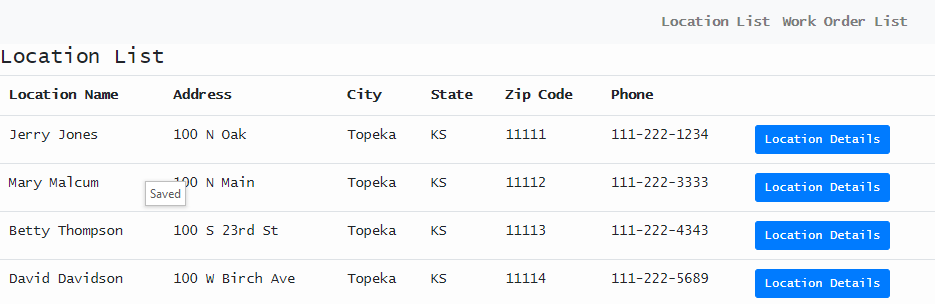
Now we see what it takes for Django to display information in the browser. Views control what is displayed and in what template, URL patterns route the url to the right view, and templates render the information, as requested. So far, all our development has been read-only. Next, we’ll build some forms which will be used to create and update data.
Proudly powered by WordPress